Overview
Carryover is the process by which an unobligated balance remaining at the end of a budget period may be moved to the next budget period to cover allowable costs. This can either be done automatically (no sponsor approval required) or it can be done after a sponsor approves a carryover request.
Note: The term “carryover” is synonymous with “carryforward”.
Automatic Carryover (Does Not Require Sponsor Prior Approval)
Automatic carryover is a term found on a sponsored program award document that indicates no sponsor prior approval is required.
GCA adds a Workday award line special condition to indicate that the carryover is automatic (“Automatic Carryover”). This special condition is visible in Workday and in the Grants tab of Award Portal.
GCA transfers the unobligated balance when preparing the sponsor financial report or final sponsor invoice. No request from campus is required to initiate this process.
Carryover Requires Sponsor Prior Approval
When a sponsor indicates that carryover requires prior approval, the Workday award is set up with a separate grant worktag for each budget period. This is necessary to separately account for each budget period’s funds. Visit GCA’s Separate Year Accountability for more information.
For federal Letter of Credit awards, the unobligated balance is carried forward to the future budget period when the sponsor financial report is prepared. The funds are allocated as restricted funding (Object Class 21: Restricted Funds) to indicate that they are unavailable.
For other types of awards, the unobligated balance remains on the expired grant worktag until sponsor approval is received.
Campus units must work with the Office of Sponsored Programs (OSP) to obtain sponsor approval to use carryover funds. Visit OSP’s Award Changes for instructions.
Once complete, OSP routes the SAGE Modification Request (MOD) to GCA. GCA first reviews the request then updates the budget information in Workday based on the SAGE Budget worksheet provided with the Carryover MOD.
- Carryover Budget Breakdown Provided by Sponsor: When a budget breakdown for the carryover is provided by the sponsor, a SAGE Budget worksheet should be created that aligns with the approved budget. GCA will reduce funds from the restricted category and release them to the appropriate cost categories based on the provided SAGE Budget worksheet.
- No Carryover Budget Breakdown Provided by Sponsor: When no budget breakdown is provided by the sponsor, a simple SAGE Budget worksheet can be created distributing the funding between unallocated and F&A (when applicable). GCA will reduce funds from the restricted category (Object Class 21) and release the carryover funding to the unallocated category (Object Class 24) if the F&A rate is 0% or to the unallocated category (Object Class 25) and F&A (Object Class 29).
Sponsor Limitation on Carryover
Sponsors may include a term to limit the amount of carryover funding that can be used in future periods without prior approval.
The Workday award is set up with a separate grant worktag for each budget period. This is necessary to separately account for each budget period’s funds in the event that the unobligated balance exceeds the carryover limitation. GCA adds a Workday award line special condition to indicate this term: “Carryover Subject to Sponsor Limitations”.
When preparing the sponsor financial report or final sponsor invoice, GCA transfers the unobligated balance as available if it is less than the sponsor’s carryover limit. If the unobligated balance is greater than the limit, GCA transfers it as restricted funding.
Checking for Restricted Funding in Workday & Award Portal
Workday - Restricted funding is visible in the Workday Plan or the Workday R1234 report in “Object Class 21: Restricted Funds”. Restricted funding is typically allocated to the primary grant worktag.
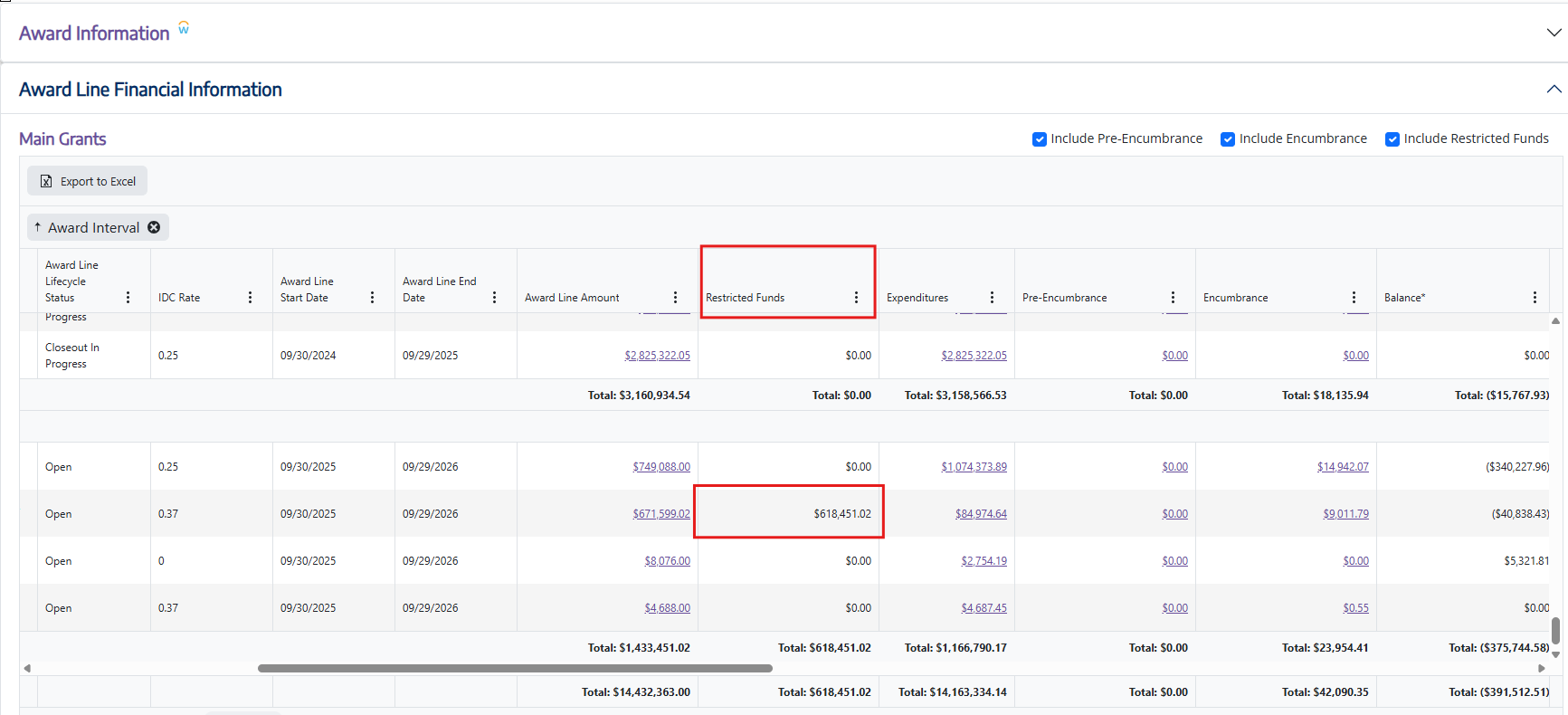
Award Portal - Restricted funding can also be seen in Award Portal within the Award Line Financial Information section, column "Restricted Funds".
Resources
- Office of Sponsored Programs Award Changes
- GCA Separate Year Accountability